


Every September, like clockwork, a new phone drops. A new laptop line gets announced. Your social feed fills with comparison videos, and a familiar question surfaces: should you upgrade?
- The Real Cost of Upgrading Your Devices Every Year
- How Much Do Devices Actually Improve Year Over Year?
- Should You Upgrade Your Phone Yearly — Or Wait It Out?
- Device Lifespan by Category — How Long Should Each One Last?
- The Environmental and Psychological Cost Nobody Talks About
- How Budget-Conscious Users Can Get More From What They Already Own
- When Upgrading Every Year Actually Makes Sense
- Conclusion
For most people, the answer is no. Yearly upgrades cost more than you think, improve less than you are told, and leave you on a satisfaction cycle that resets faster than your instalment plan. Here is what the numbers actually show, and how to decide based on your needs, not a launch calendar.
The Real Cost of Upgrading Your Devices Every Year
The sticker price is the number most people focus on. It is not the number that matters most.
When you upgrade a flagship smartphone every year, you are not just paying $999 or $1,199 for the new device. You are absorbing a chain of smaller costs that rarely appear in any launch-day headline. Add them up, and the true cost of annual upgrades is far higher than most people expect.
In 2024 and 2025, the average flagship smartphone price across major brands settled between $900 and $1,300. Mid-range phones with strong specs hovered between $400 and $700. Neither category is cheap to replace on a 12-month cycle.
The financial case against yearly upgrades is not just about the purchase price. It is about what you lose in the process: trade-in value gaps, accessories that do not transfer, time spent switching, and the psychological cost of always chasing something newer.
What You Actually Pay When You Factor in Trade-In Losses
Trade-in programs look generous on launch day. They rarely are once you read the fine print.
A flagship phone worth $1,000 new typically trades in for $400 to $600 after 12 months, depending on condition, storage tier, and carrier. That means you absorb $400 to $600 in depreciation every year.
Carrier promotions often advertise “up to $1,000 off” when you trade in. What they do not say upfront is that the full credit usually requires switching plans, signing a 36-month agreement, or trading in a specific model in pristine condition.
Here is what a realistic cost comparison looks like over three years:
| Upgrade Cycle | Total Device Cost (Approx.) | Notes |
|---|---|---|
| Every 1 year | $1,200 to $2,100+ | High depreciation, accessories replaced repeatedly |
| Every 2 years | $600 to $900 | Depreciation slows, some accessories are reused |
| Every 3 years | $350 to $600 | Best long-term value, minimal accessory cost |
The math strongly favours patience.
Accessories, Data Migration, and the Hidden Time Tax
Every upgrade brings a list of extra expenses that feel small individually but compound fast.
A new phone case costs $20 to $50. A new screen protector is another $10 to $30. If the charging port or connector changed, you are buying new cables and adapters. Wireless earbuds that paired seamlessly with your old device may need re-pairing or, in some cases, may not work as well with the new one.
Then there is the time cost. Backing up a device, restoring to a new one, re-downloading apps, re-entering passwords, and getting your home screen back to where it was comfortable takes two to four hours for most people. Do that every year, and you spend a full workday of your life switching devices. That time has real value.
How Much Do Devices Actually Improve Year Over Year?
The tech upgrade cycle is built on a simple idea: newer is better. The reality is that newer is slightly better, most of the time, for most people.
Year-over-year hardware improvements are real. They are also increasingly small. The leap from a 2018 flagship to a 2021 flagship was substantial. The leap from a 2024 flagship to a 2025 flagship is, in most practical use cases, almost invisible to the average user.
Understanding what actually changes between generations helps you judge whether an upgrade solves a real problem or just replaces something that already works.
Flagship Phones: Small Gains Dressed as Big Leaps
Consider the iPhone 15 to iPhone 16 jump. Apple’s own benchmarks showed roughly a 15 to 20 per cent improvement in CPU performance. The cameras received modest updates. The action button gained a small function change. For someone making calls, browsing, streaming, and taking occasional photos, those differences are hard to notice in day-to-day use.
The Samsung Galaxy S24 to S25 story is similar. The S25 runs a faster processor and offers improved AI photo processing. Real-world camera output differences between the two, when tested by independent reviewers, required side-by-side pixel analysis to spot.
For the tasks that make up 90 per cent of most people’s phone use, a one-year-old flagship performs identically to the newest model. The hardware gap is not large enough to change your experience.
When a New Device Does Offer Something Different
Some upgrades do deliver a noticeable difference.
The shift from no telephoto lens to a proper 3x or 5x optical zoom is something you see every time you take a photo at a distance. A battery capacity jump of 20 per cent or more changes how often you reach for a charger. A new health sensor, like blood oxygen or continuous glucose monitoring, can have real value for users managing specific health conditions.
The question to ask is whether the new feature solves a problem you actually experience. If you never use Zoom, a better telephoto lens is not a reason to upgrade. If your battery struggles to last the day, that is worth a serious look.
Should You Upgrade Your Phone Yearly — Or Wait It Out?

The answer depends almost entirely on your personal situation, not on what has just launched.
The most useful concept here is the personal upgrade trigger: a specific, real reason your current device no longer meets your needs. Not a want. Not a feeling. A concrete, recurring problem that a new device would fix.
Until you hit a personal upgrade trigger, you do not have a reason to upgrade. Full stop.
Signs Your Current Device Is Actually Due for Replacement
Some situations call for a new device. Here is an honest checklist:
- Battery health has dropped below 80 per cent, and the device no longer lasts through a full day
- The manufacturer has cut off software and security updates for your model
- Apps you rely on regularly crash, freeze, or no longer support your OS version
- Physical damage is affecting core function, such as a cracked screen that obscures the display or a broken microphone
- Storage is permanently full with no reasonable fix, and the device does not support expansion
If two or more of these apply, an upgrade is a reasonable decision. If none of them applies, your device still has life in it.
Signs You Are Being Pushed to Upgrade Before You Need To
Manufacturers are skilled at making small changes feel essential. Here are the patterns to watch for:
A new colour option is not a performance upgrade. A slightly slimmer profile does not change how you use the device. A camera that captures “4 per cent more light in low conditions” is not a reason to spend $1,000. A processor that scores 12 per cent higher on a synthetic benchmark you will never run in real life does not make your current phone slow.
Launch events are built around comparison slides that always put the new device on the right and the old one on the left. Recognising that format as a sales presentation helps you evaluate the actual change rather than the feeling the event is designed to produce.
Device Lifespan by Category — How Long Should Each One Last?
One practical step for any budget-conscious user is to know the realistic lifespan of each device you own. When you have a real benchmark, you stop measuring your device against the newest model and start measuring it against a reasonable endpoint.
The tech industry rarely advertises these numbers. Here they are plainly.
Smartphones: The Sweet Spot Between Performance and Support
Most flagship smartphones perform well for three to four years of daily use. Hardware does not suddenly fail at year three. It gradually shows its age through slower app load times, older camera processing, and a battery that has gone through enough charge cycles to hold less capacity.
Software support is the more practical measure. Here is where major brands currently stand:
- Apple: iPhones typically receive iOS updates for six to seven years. The iPhone 12, released in 2020, still receives full iOS updates as of 2025.
- Google: Pixel 8 and later models are guaranteed seven years of OS and security updates.
- Samsung: Galaxy S and Z series from 2024 onward receive seven years of security updates and four generations of OS upgrades.
A phone that still receives security updates is a phone that is still safe and functional. Use that support window, not the launch of a new model, as your replacement signal.
Laptops, Tablets, and Earbuds — Different Cycles, Different Rules
Laptops have a longer useful life than most people realise. A mid-range to high-end laptop purchased in 2022 for general use — web browsing, documents, and video calls — will handle those same tasks comfortably through 2027 or 2028. Four to six years is the practical lifespan for a well-maintained machine.
Tablets follow a similar pattern to phones. A good tablet from a major brand performs well for four to five years, with software support lasting a comparable window on Apple’s iPadOS.
Earbuds have the shortest useful life, but for a specific reason: battery degradation. True wireless earbuds use tiny lithium cells that lose capacity noticeably after 300 to 500 charge cycles, which works out to roughly two to three years of daily use. This is a real hardware limitation, not a manufactured one.
The Environmental and Psychological Cost Nobody Talks About
The cost of upgrading every year is not only measured in money. There are two other costs worth honest attention: what happens to the devices we discard, and what the upgrade habit does to our sense of satisfaction.
E-Waste and the Environmental Weight of the Annual Upgrade Cycle
The world generated 62 million metric tonnes of e-waste in 2022, according to the UN’s Global E-waste Monitor. That figure is projected to reach 82 million metric tonnes by 2030. Consumer electronics, including smartphones, are a significant contributor.
Manufacturing a single smartphone requires rare earth minerals, significant water use, and a production process that generates a carbon footprint before the device ever reaches a shelf. Extending a device’s life by even one additional year reduces the per-year environmental cost of owning it.
Repairability is part of this picture. Apple, Samsung, and Google have all expanded their self-repair programs in recent years, making it easier to replace a battery or screen without buying a new device. Some brands still make their hardware difficult to open or repair. Checking a brand’s repairability score before purchasing is a worthwhile habit.
The Upgrade Treadmill and What It Does to Your Satisfaction
Psychological research on hedonic adaptation shows that people return to a baseline level of satisfaction quickly after a positive change.
In practical terms, a new phone feels exciting for about two to four weeks. After that, it becomes a normal phone. The satisfaction fades, but the financial commitment remains for months or years.
Studies on consumer technology purchases show that the anticipation of an upgrade generates more satisfaction than the ownership itself. That is the treadmill: the next device always looks more exciting than the one you are holding, because you are comparing imagined ownership against real, familiar ownership.
Knowing this pattern does not eliminate it. But it does help you pause before mistaking excitement for necessity.
How Budget-Conscious Users Can Get More From What They Already Own
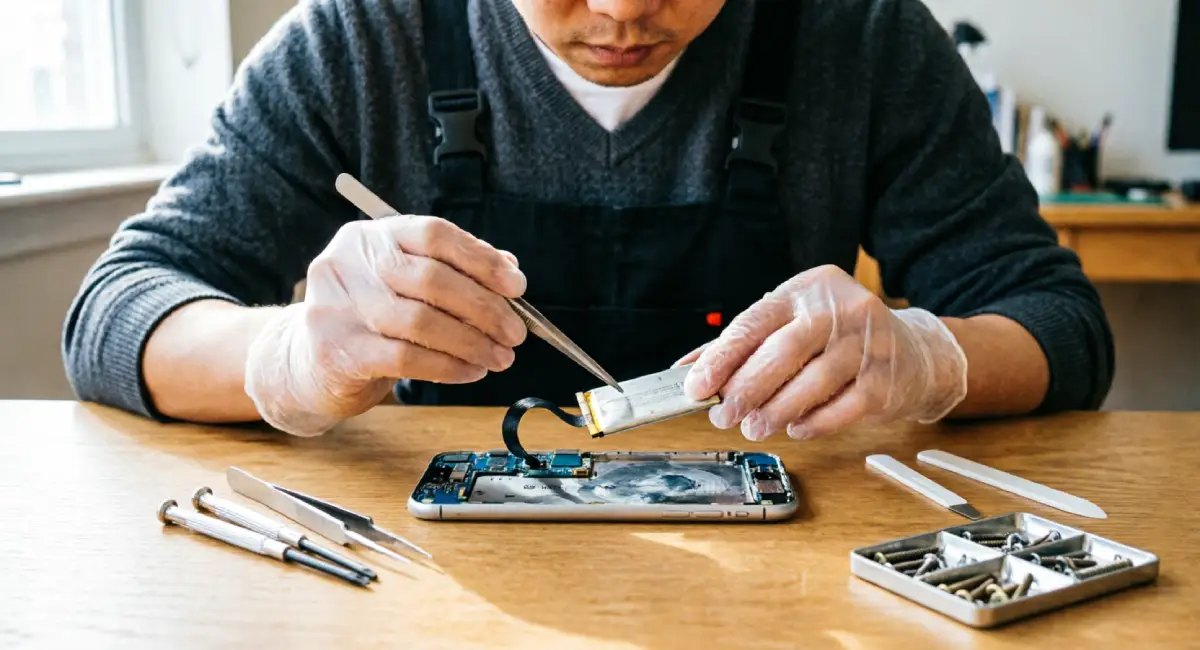
Before considering any upgrade, there are steps that can extend your current device’s useful life by one to two years. Most cost very little.
Battery Health: The Single Biggest Factor in Device Longevity
A degraded battery is the most common reason people feel their phone has gotten slow. In many cases, the hardware is not the problem. The battery is.
When battery health drops below 80 per cent, iPhones automatically enable performance throttling to prevent unexpected shutdowns. Android devices experience similar slowdowns as the power supply becomes less stable. The phone feels sluggish not because the processor is outdated, but because it is protecting itself from an underperforming battery.
The fix is straightforward: replace the battery.
Approximate battery replacement costs as of 2025:
- iPhone (via Apple): $99 for most current models out of warranty
- Samsung Galaxy (via Samsung): $80 to $100 depending on model
- Third-party repair shops: $40 to $70 for the most popular models
Compare that to $1,000 for a new flagship. A battery replacement that gives your existing device two more years of strong performance is one of the best-value decisions you can make.
Software Habits That Keep Older Devices Running Well
Hardware is only part of the story. How you manage software directly affects how well an older device performs.
A few habits that make a real difference:
- Clear app cache regularly, particularly for apps you use every day, like browsers and social media
- Limit the number of apps running in the background through your device’s battery or privacy settings
- Avoid installing OS beta versions on a primary device — betas are optimised for testing, not daily performance
- If your device has slowed significantly, a factory reset followed by a clean restore can recover a surprising amount of performance.e
- Uninstall apps you no longer use. Bloated storage and unnecessary background processes are a consistent drag on older hardware.
None of these requires technical expertise. They take under an hour, and the difference on a two or three-year-old device is often noticeable.
When Upgrading Every Year Actually Makes Sense
The case for waiting is strong. But there are users for whom upgrading every 12 months is a reasonable decision.
The key distinction is whether the upgrade serves a real professional or functional need, or whether it is driven by habit and marketing.
Professionals and Creators Who Depend on Cutting-Edge Hardware
A mobile videographer who shoots client work on a smartphone benefits from improvements in stabilisation, low-light video, and ProRes recording. For them, the camera upgrade between generations translates into better client deliverables and potentially more business.
A developer who tests apps on the latest iOS or Android version needs a device running that version at full performance. Using hardware from two cycles ago introduces variables that can obscure real software issues.
A small business owner who uses their phone as a primary point of sale, communication, and content creation tool may find that hardware limitations slow their work. The upgrade in that context is a business expense with a measurable return.
For these users, the annual upgrade is a professional tool decision, and it deserves to be treated that way.
How to Upgrade Annually and Still Keep Costs Under Control
If yearly upgrades fit your life, there are smarter ways to do it.
Buy last year’s flagship instead of the newest model. When a new phone launches, the previous generation drops in price by $150 to $300 almost immediately, while delivering nearly identical performance. You absorb far less depreciation, and the feature gap is minimal.
Time your trade-in to coincide with launch season. Trade-in values are highest in the weeks just before and after a new device launches, when demand for recent models peaks.
Avoid 36-month carrier instalment plans if you intend to upgrade every 12 months. You will be paying off a device you no longer own. A shorter payoff cycle or an outright purchase with a planned resale gives you more control and better long-term economics.
Conclusion
For most budget-conscious users, upgrading devices every year is not worth it.
The real cost of annual upgrades goes well beyond the price tag. It includes trade-in losses, accessory replacement, time spent switching, environmental impact, and a satisfaction cycle that resets faster than your instalment plan.
The devices you already own are almost certainly more capable than you think. A battery replacement, a software clean-up, and knowing your personal upgrade triggers will serve you better than any launch-day announcement.
Before you consider your next upgrade, spend 30 minutes with your current device. Check the battery health. Clear some cache. Look up when your model stops receiving security updates. You may find that the device in your hand still has one, two, or even three good years left.
If you found this helpful, take a look at the parent guide: How Do You Choose Tech Products Without Falling for Hype? It covers the broader decision process for buying tech with confidence and without regret.